How do you delete your GeoInTime™ Account?
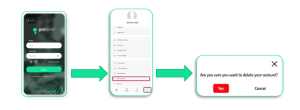
To Delete your GeoInTime™ Account through the GeoInTime™ Mobile App, follow the below Steps:
- Log in to your account through the mobile app
- Click on More from the bar menu.
- On the menu, scroll down and click on Delete Account.
- On the following pop-up message confirm account deletion click on Yes to confirm account deletion.
What happens with the data after mobile app account deletion?
After deleting the GeoInTime user’s “employee” account all data (Name, email, phone number, attendance record) will be kept on the GeoInTime organization portal “Employer Portal” which is accessible by the organization owner only.
How does a user “employee” appear in the organization after the user deletes their mobile app account?
- When a user deletes their own GeoInTime mobile account, the user will be deactivated on the GeoInTime web portal
- Behavior of deleted a user in the organization from the GeoInTime web portal: The user’s personal info, attendance record, and all related info will be permanently deleted from the database
Upon permanent deletion, all historic data will be erased from the app and cannot be retrieved anymore.